TL;DR
Missing or inaccurate SOV data leads to poor CAT modeling results, inaccurate AALs, and weaker underwriting outcomes. Archipelago’s Agent gives brokers an immediate assessment of SOV data health: flagging gaps, prioritizing the fields that affect modeling most, and running enrichment automatically in the background before renewal season starts.
If you manage property submissions, missing and inaccurate SOV data is one of the most common reasons renewals stall. Just as a regular checkup ensures our physical well-being, a thorough review of your client's Statement of Values (SOV) ensures the health of their property data. Construction types left blank, valuations that haven't been updated in years, occupancy fields filled with placeholders: underwriters see these gaps, and either price conservatively or decline to quote. This article walks through exactly how to find and fix missing SOV data before it costs your client markets, using Archipelago’s Agent.
Why Missing SOV Data Is a Problem
Most brokers don't know where their data gaps are until it's too late. SOVs arrive from clients in inconsistent formats, key fields get left blank or filled with placeholder values, and there's no automated check to catch what's missing before the submission goes out.
The downstream effects are significant: inaccurate Average Annual Loss estimates, higher modeled losses, and markets that either decline to quote or price conservatively to compensate for the uncertainty. Finding and fixing missing SOV data before submission is one of the highest-impact things a broker can do for their client.
How to Clean Property Exposure Data
Cleaning exposure data means systematically finding, correcting, and enriching the property fields that underwriters and CAT models rely on. The following steps apply whether you are preparing a new submission or auditing an existing SOV ahead of renewal:
- Audit for blank and placeholder values. Export your SOV and filter for empty cells, zeros, and generic entries like “unknown," “other," or “TBD" across every COPE field. Construction type, occupancy class, year built, total insurable value, and all four geohazard fields (flood zone, seismic zone, wildfire score, and wind tier) must be treated as required, not optional. Any blank in these columns is a gap that will either stall the submission or force a conservative underwriting assumption.
- Standardize construction and occupancy classifications. Free-text entries like “brick building" or “mixed use" are not actionable for underwriters or CAT models. Map every construction entry to an ISO construction class (1–6) and every occupancy entry to a specific ISO or SIC code. If the same property type is described three different ways across your portfolio, pick one and apply it consistently.
- Verify and update replacement cost values. Stale valuations are one of the most common and most consequential data quality problems in property insurance. Check the date of each property's last valuation and flag any that have not been updated within the past 12 months. Apply current construction cost benchmarks to assess whether existing values still hold up: undervalued properties create coinsurance exposure that surfaces at the time of claims.
- Resolve address and geocoding errors. Every property needs a verified latitude/longitude coordinate, not just a street address. Run each location through a geocoder and manually review any that return low-confidence matches, fall in water, or land on a road centerline rather than a building footprint. Hazard scores applied to a wrong coordinate produce incorrect flood zone, seismic, and wildfire data for that location.
- Enrich missing geohazard fields. Once geocoding is confirmed, populate any blank hazard fields using authoritative sources: FEMA NFIP for flood zone designations, USGS for seismic zone data, and equivalent sources for wind tier and wildfire score. Do not leave these fields blank or estimated: CAT models default to worst-case assumptions when hazard data is missing, which directly inflates modeled losses and AALs.
- Cross-reference against source documents. For high-TIV locations, validate self-reported COPE data against property condition assessments, roof inspection reports, and building permit records. Discrepancies between what the SOV says and what the documents show are a common source of underwriting friction and post-loss disputes. Flag conflicts for broker follow-up rather than silently accepting the SOV value.
-
Document every change with a source and date. Cleaned data is only useful if it is traceable. For each field you correct or enrich, record where the updated value came from and when the change was made. This audit trail supports carrier review, renewal submissions, and internal quality control, and demonstrates to underwriters that the data has been actively maintained, not just submitted as-received from the client.
How to Find Missing or Inaccurate Data in an SOV
Archipelago’s Agent gives brokers a structured, three-step process to identify gaps, prioritize fixes, and track improvements over time.
Step 1: Get a Live Assessment of Data Health
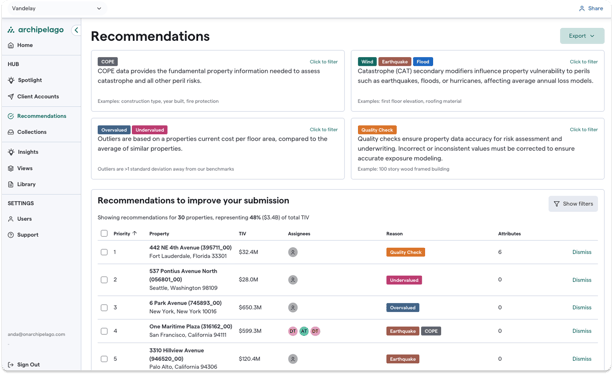
Your data assessment starts with diagnostics. Simply drag your latest SOV into Archipelago’s Agent: it ingests any file format, including unstructured spreadsheets and PDFs, and immediately surfaces where your data falls short.
.png?width=613&height=375&name=Library%20(1).png)
By pinpointing areas of improvement and taking necessary actions, brokers can enhance the overall quality of their clients' data.
If your account is already there, you can skip this step and log in at any point to get real-time information about your data.
Step 2: Prioritize the Gaps That Actually Matter
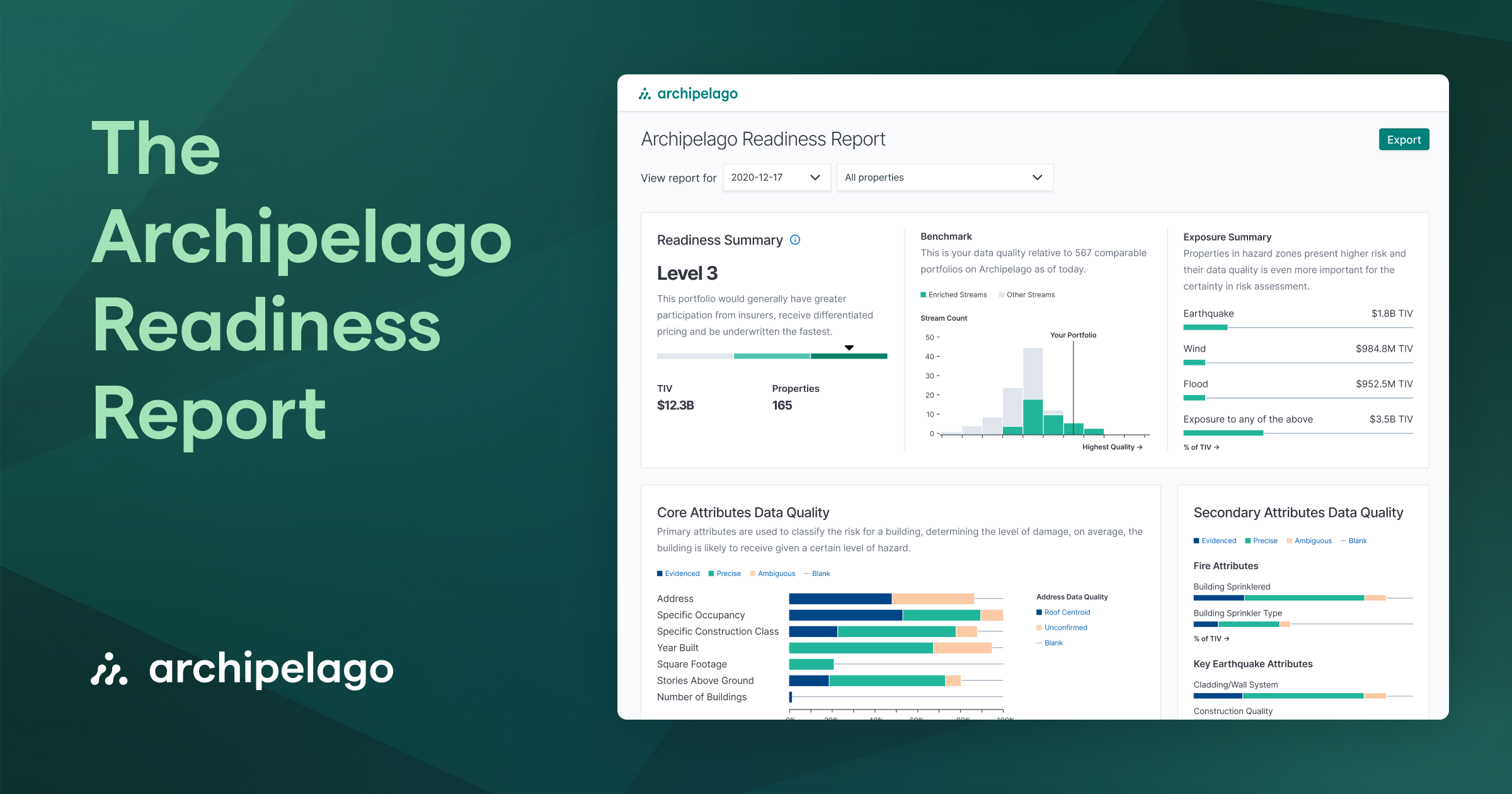
The good news is that, regardless of where your data is right now, Archipelago’s Agent runs enrichment automatically in the background, pulling in geocoding, COPE data, rules and codes, and third-party sources. And while there are hundreds of new data points, not all of them are created equal. As such, customers receive prioritized recommendations on how to improve SOV health, categorized by Total Insurable Value (TIV) and hazards. Specifically, these recommendations are designed to make the biggest impact on CAT modeling and Average Annual Losses (AALs). So, instead of filling out all the empty cells, you can focus on the ones that matter the most.
Step 3: View and Share Dynamic Reports
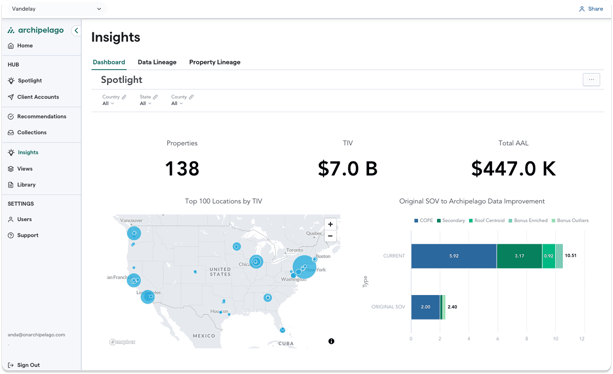
Agent’s dynamic reporting capabilities allow you to continuously monitor and share updates with clients. By visualizing each client's property portfolio through map views or prioritized lists of data gaps, you can effectively communicate improvements and areas needing attention. Upload inspection reports and other property documentation to keep the SOV current and accurate, ensuring you always have access to up-to-date, actionable insights.
cta-inline-card

AI Agent for Insurance Brokers
-

Ingests and repairs your data automatically
SOVs, Loss Runs, Revenue, Payrolls, Vehicle lists, and more
-

Remediates issues before they hit modeling
Fix problems, explain impact, and track progress
-

Provides action-oriented recommendations
Prioritize open items and resolve gaps faster
Key Benefits of Archipelago’s Agent for Brokers
- Track Data Quality in Real Time: Agent offers immediate and actionable insights into property data, allowing brokers to give prospects and clients a comprehensive, up-to-date scan of their data health.
- Jump-Start Renewals: Address data quality issues easily and early on to streamline your annual pre-renewal strategy planning and ensure that renewals are based on the most accurate data.
- Equip Clients with a Plan: Empower prospects and clients to communicate priorities within their organizations more effectively, making it easier to manage and act upon data insights.
- Offer Superior Advisory: With detailed insights from the Agent, brokers can provide superior advisory services that guide clients toward better underwriting outcomes and more informed risk decisions.
“I love using the Agent. It helps me explain to clients which locations should have better data quality and how this may impact how the markets underwrite the account. But more importantly, its recommendations help customers prioritize tasks and focus on what really matters.”
– John Keeler, Area Senior Vice President, Gallagher
Who Benefits from Archipelago’s Agent?
The Agent is designed to aid brokers in identifying and prioritizing data improvements for their clients. Brokers on Archipelago gain back the time they used to spend searching for missing data and utilize it by providing the best possible consultative service to their clients. Additionally, risk managers can benefit from the Agent as they know exactly which properties require more attention. Risk managers can then disseminate this information across their internal stakeholders to ensure timely data collection.
Archipelago’s Agent is built for teams, not just individual brokers. Multiple people can work on the same SOV simultaneously: flagging gaps, uploading documents, and tracking improvements in real time, so nothing falls through the cracks before submission. Everything stays consistent, version-controlled, and ready for carrier review. Contact us to get a personalized walkthrough or to get started.
Share this

Insurance Document Automation with Archipelago's AI Agent

Work Smarter, Not Harder With Archipelago AI